Google Local Services Ads management
Pay-per-lead placement above the Search results, with the Google Verified badge.
Management of Google Local Services Ads — the pay-per-lead placement that appears above standard Search and Maps results, with the Google Verified badge once you pass Google's screening and verification.
How it works
01/03
Set the budget
A daily budget, changed without logging in to Google
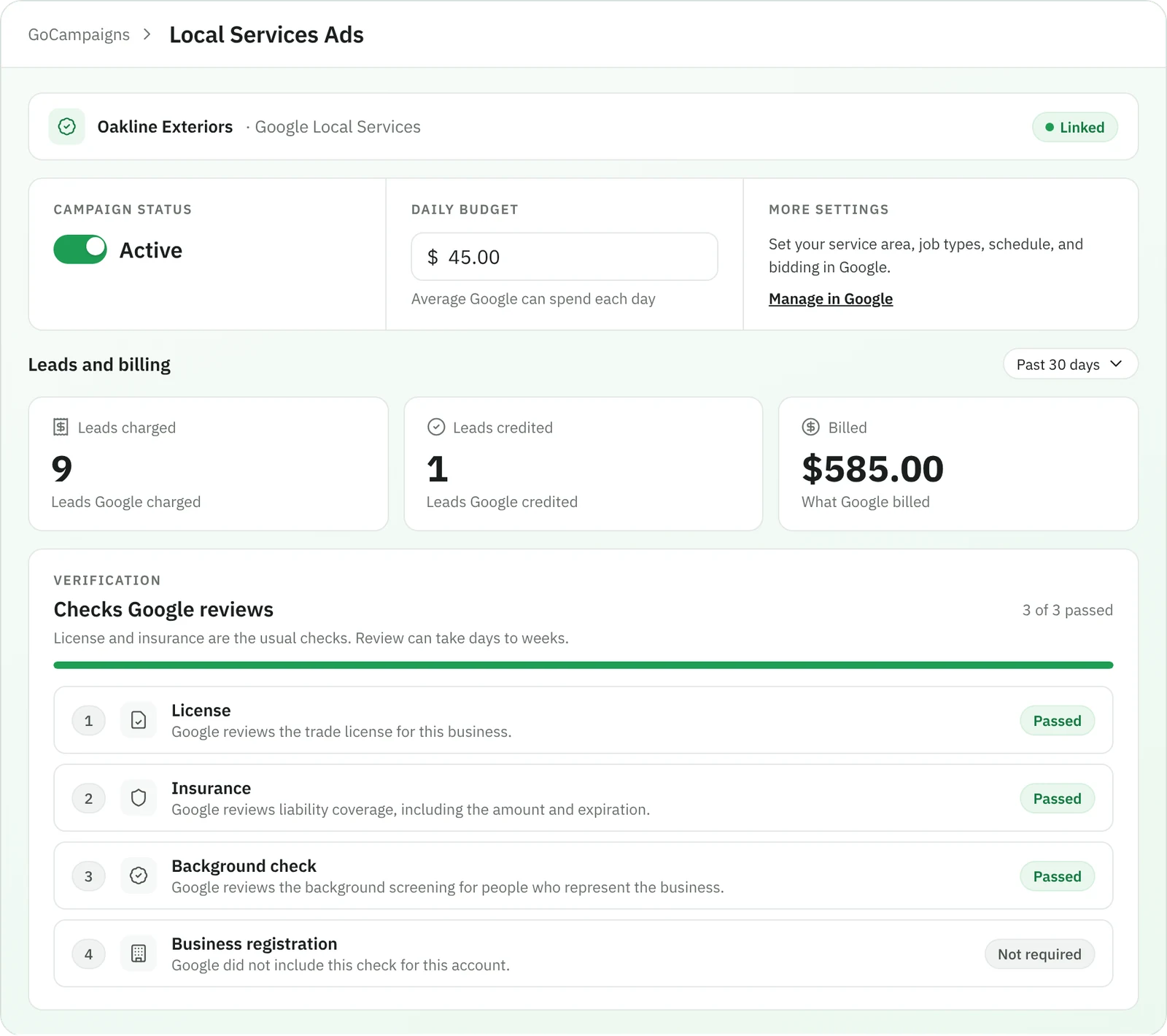
Turn the campaign on or off and set what Google can spend each day. Service area, job types and schedule stay one click away in Google.
02/03
Leads and billing
See which leads Google charged and credited
Charged leads, credited leads and what Google billed sit side by side, so the bill is never a surprise.
03/03
Get verified
Track every check Google needs
License, insurance and background checks each show their status, so you know what stands between you and the Google Verified badge.
What our Local Services Ads management does
Everything Local Services Ads handles — built in, not bolted on.
- Google Verified screening and verification support
- Budget management with pay-per-lead tracking
- Charged, credited and billed leads tracked in one view
- Service area and job-type targeting
- Call tracking and recording on every Local Services lead
- Every Local Services lead drops straight into your Gozango sales pipeline
- Integration with business catalog for service-type targeting
What changes with Local Services Ads management
What life looks like before and after.
- Before
Another login, another export, another guess.
AfterAppear above standard Search and Maps results for your services
- Before
Manual work that should happen automatically.
AfterPay only for leads, not clicks
- Before
Scattered across tools that don't share a record.
AfterEarn the Google Verified badge that builds trust instantly
- Before
Easy to drop when the day gets busy.
AfterSee which leads were charged and which were credited
- Before
No single place that shows whether it's working.
AfterEvery Local Services lead lands in your pipeline with its source
How much does Local Services Ads management cost?
Local Services Ads management comes with the Expand plan at $297 a month and with Founder's Club at $497 a month. Gozango adds a 5% platform fee on your ad budget when you pay by ACH, or 8% by card, and the budget itself goes to Google at cost. You still pay Google per lead, not per click. Gozango handles budget management and Google Verified screening and verification support, and every lead lands in your Gozango sales pipeline. For comparison, agencies typically charge 10–20% of ad spend to manage campaigns. Billing is month-to-month with no contracts.
When contractors use Local Services Ads management
How operators put this to work.
- Lead Generation
Business wants top-of-page placement without competing on cost-per-click
Local Services Ads charge per lead, not per click, so you show above the Search results without managing bids.
- Lead Generation
New business without reviews yet building instant trust via the Google Verified badge
Earn the Google Verified badge, which shows on your ad while your reviews build.
- Lead Generation
Service business getting invalid or out-of-area leads
Google credits invalid leads automatically, and you see every charge and credit in Gozango.
- Lead Generation
Multi-location business budgeting Local Services spend by market
Set Local Services spend market by market, so budget follows the locations that book jobs.
More in Lead Generation
Explore what else ships in this category.
Pay-per-lead placement at the very top of Google, with the Google Verified badge — and every lead lands in the same pipeline as the rest of your marketing.